Quick Answer: Summary of Steps
- Update the game and the DLC. Pearl Abyss says mismatched versions can crash the game.
- Verify the game files (PC). Steam: Properties › Installed Files › Verify integrity. Epic: Manage › Verify.
- Update your graphics driver and check the specs. An SSD is required and the minimum GPU is an RX 5500 XT or GTX 1060.
- Check the Known Issues list. Some crashes and freezes are acknowledged bugs with a workaround.
- Send a PERS report. Run PERS.exe from the bin64 folder and paste the Unique ID into the report form.
Prerequisites & Materials Needed
Required tools & items
- Your platform and game version — shown on the title screen; needed for any report
- An internet connection — for updates and file verification
- Admin access on your PC — for driver updates and running PERS.exe
- About 180 GB on an SSD (PC) — plus about 50 GB for Charting the Unknown
Estimated time
- Preparation: About 5 minutes to note your version, platform and when the problem happens
- Execution: 15–45 minutes, mostly waiting for verification and updates
Step-by-Step Instructions
Step 1: Update the base game and the DLC
The most common crash since 29 October is a version mismatch between the game and Charting the Unknown.
- Execute: on Steam or Epic, let the library finish every pending update. On PS5 press Options › Check for Update; on Xbox open Manage game and add-ons › Updates.
- Relaunch the game only when both the game and the DLC show no pending downloads.
- Pro Tip: On the Mac App Store, updates may arrive slightly later than on other platforms. Wait for the patch before relaunching.
- Look out for: Do not launch the game while an update is half-downloaded.
How you know it worked: The title screen shows the latest version number from the patch notes.
Step 2: Verify the integrity of the game files (PC)
Pearl Abyss says corrupted files can cause launch failures, crashes and glitched graphics.
- Execute: in Steam, right-click Crimson Desert › Properties › Installed Files › Verify integrity of game files.
- In the Epic Games Launcher, click the three dots next to the game › Manage › Verify.
- Pro Tip: Verification can take several minutes on a 180 GB install. Let it finish.
- Look out for: Reinstalling is slower than verifying and rarely necessary.
How you know it worked: Steam or Epic reports that all files are validated, or re-downloads only the broken ones.
Step 3: Update your graphics driver and check the requirements
The game needs DirectX 12, 16 GB of RAM and an SSD, and stability depends on current drivers.
- Execute: install the latest driver from AMD, NVIDIA or Intel, then restart the PC.
- Compare your PC with the minimum spec: Ryzen 5 2600X or Core i5-8500, 16 GB RAM, RX 5500 XT or GTX 1060.
- Pro Tip: If rain looks blurry or vanishes, switch the upscaler away from FSR4. It is a known issue.
- Look out for: Intel Arc GPUs run the game but are not yet optimised, according to Pearl Abyss.
How you know it worked: The game reaches the main menu and loads a save without crashing.
Step 4: Check the Known Issues notice for your symptom
If the problem is a known bug, there may be a workaround and a fix on the way.
- Execute: open the official Known Issues notice and look for your symptom.
- Apply the listed workaround: restart the game if NPC or mount interactions stop working, type slowly on the PS5 virtual keyboard, and switch to Kliff for Greymane faction quests.
- Pro Tip: The notice is updated regularly; the last update before this guide was 30 October 2026 at 15:00 UTC.
- Look out for: Twitch Drops must be claimed in stream chat for now; the in-game menu does not work.
How you know it worked: You have either found a workaround or confirmed the issue is not yet listed.
Step 5: Send a report through PERS
PERS sends your logs, crash dump, save and PC specs automatically, which gives Pearl Abyss the most detail.
- Execute: in Steam, choose Manage › Browse local files, open the bin64 folder and run PERS.exe (Epic: Crimson Desert\bin64 under C:\Program Files\Epic Games).
- Choose the issue type, write at least 10 characters, click Send, and paste the Unique ID that is copied to your clipboard into the Report an issue survey.
- Pro Tip: You do not need to attach files or list your PC specs in the survey; PERS has already sent them.
- Look out for: On PS5 and Xbox there is no PERS tool, so use the report form and describe your version and what you were doing.
How you know it worked: The survey confirms your report has been submitted.
In brief: Most Crimson Desert crashes and launch failures have one of four causes: the base game and DLC are on different versions, damaged game files (PC), an old graphics driver (PC), or a known bug that Pearl Abyss is already fixing. Update everything first, verify files, update your driver, then check the official Known Issues list. If it still fails, send a report through Pearl Abyss's PERS tool. Steps below come from Pearl Abyss's support pages and its Known Issues notice (last updated 30 October 2026, 15:00 UTC).
By Tulasiram Pemmadi · NextPlayIntel · Last updated 31 October 2026.
This guide covers PC (Steam and Epic), Mac, PS5 and Xbox Series X|S. Hardware problems with the console itself are covered in our PS5 troubleshooting guide and Xbox Series X|S troubleshooting guide. For prices and PC requirements see the Crimson Desert game page.
Match the fix to the problem
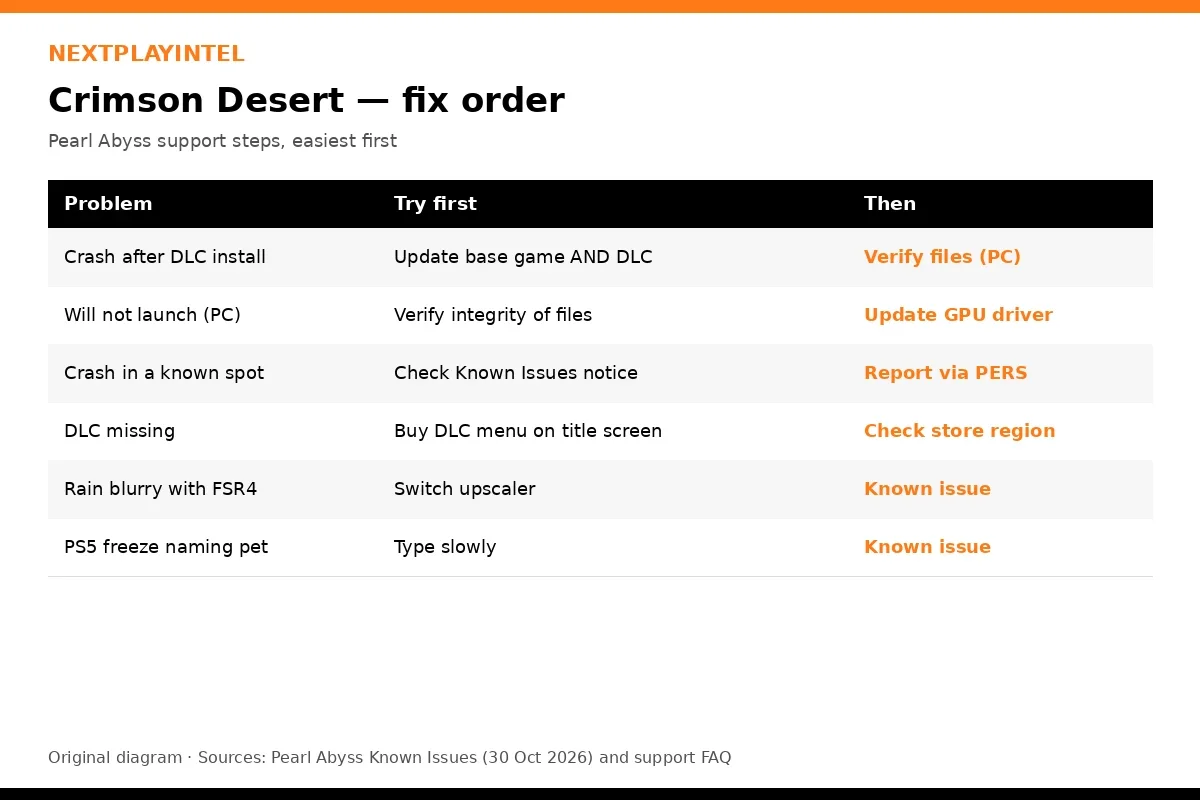
Problem | Try first | Then |
|---|---|---|
Crashes since installing Charting the Unknown | Update the base game and the DLC to the latest version | Verify files (PC) |
Will not launch on PC | Verify integrity of game files | Update your GPU driver |
Crashes in one place every time | Check the Known Issues notice | Report through PERS |
DLC does not show up | Update the game; use Buy DLC on the title screen | Check your store region |
Rain looks blurry or disappears | Switch from FSR4 to another upscaler | Known issue, wait for a patch |
PS5 freezes when naming a pet or horse | Type slowly with short pauses | Known issue |
Xbox pre-order or Drops items missing | Wait for a fix | Known issue |
The version mismatch problem (most common since 29 October)
Pearl Abyss's Known Issues notice says: "The game may crash if the base game and DLC versions don't match. To ensure the game launches successfully, update both to the latest versions." This is the main reason for crashes reported since the expansion launched. On consoles both parts normally update together, but if automatic updates are off, or the console was in Rest Mode without a connection, one part can lag behind. On the Mac App Store, Pearl Abyss warns that updates may arrive slightly later than on other platforms.
Official PC requirements
You can only expect stable play if your PC meets the minimum specification. From Steam (31 October 2026):
Minimum | Recommended | |
|---|---|---|
OS | Windows 10 64-bit | Windows 10 64-bit |
CPU | Ryzen 5 2600X / Core i5-8500 | Ryzen 5 5600 / Core i5-11600K |
RAM | 16 GB | 16 GB |
GPU | Radeon RX 5500 XT / GeForce GTX 1060 | Radeon RX 6700 XT / GeForce RTX 2080 |
Storage | 180 GB, SSD required | 180 GB, SSD required |
Pearl Abyss's support FAQ (July 2026) still lists 150 GB; the Steam page, updated after Enhanced, lists 180 GB, and the DLC adds about 50 GB. Intel Arc GPUs were unsupported at launch and were later patched to run, but Pearl Abyss described them as not yet optimised.
Known issues on 30 October 2026
These are bugs Pearl Abyss has acknowledged. You cannot fix them yourself, but knowing they are known saves time:
The Camel Constellation and a blockaded stronghold sit in an inaccessible region.
Twitch Drops cannot be claimed from the Drops & Rewards menu; claim them in stream chat and link Twitch on the Drops page.
Xbox: some Drops and pre-order items may not appear in the Add-ons menu.
Interactions with NPCs, mounts and some objects can stop working. Restarting the game fixes it temporarily.
Greymane faction quests cannot progress while playing as Damiane or Oongka. Switch to Kliff.
With FSR4, rain can vanish or the image can blur in rainy areas.
PS5: typing quickly on the virtual keyboard when naming a pet or horse can freeze the screen.
Mac: cursor offsets in housing placement at some resolutions, and the colourblind filter does not apply to the UI.
Error codes for this game
Pearl Abyss has not published a list of numbered Crimson Desert error codes, and we do not repeat unverified codes from forums. If your console shows a system error, look it up on our platform pages, for example PS5 error CE-108262-9 or Xbox error 0x80832003. On PC, a generic launch failure is covered in Steam game won't launch.
What it costs to fix
Nothing. Every step here is free. You do not need to buy the DLC, a new edition or any third-party "fix" software. If you are on PC and your hardware is below the minimum, the only real fix is an upgrade; check the requirements before buying the game ($69.99 / ₹4,499).
For players in India
Support: Pearl Abyss support is online only (support.pearlabyss.com), so Indian players use the same PERS tool and report form as everyone else.
Slow downloads: a 180 GB install plus 50 GB DLC can be interrupted on unstable connections. If Steam shows corrupt files after a long download, run Verify integrity of game files rather than reinstalling.
DLC price: ₹1,599 on Steam India and the Xbox Store India, Rs 1,599 on PlayStation Store India (31 October 2026).
When to contact official support
Contact Pearl Abyss if the crash is not in the Known Issues list and the steps below did not help. On PC, use PERS first: it sends your logs, crash dump, save and hardware details automatically, and gives you a Unique ID to paste into the "Report an issue" form. On consoles, use the "Report an issue" form directly with your platform, game version and what you were doing when it happened.
Common Mistakes to Avoid
- Reinstalling before verifying. You re-download 180 GB when verification would fix only the broken files.
- Updating only the DLC or only the game. Mismatched versions can crash the game on launch.
- Using trainers or unofficial patches. They can break saves, trigger Denuvo checks and are not supported.
- Ignoring the SSD requirement. Hard drives cause stutter and streaming problems in an SSD-only game.
- Filing a report without the PERS Unique ID. Support has to ask you for logs, which slows the fix.
Frequently asked questions
Why does Crimson Desert crash after installing the DLC?
Usually because the game and DLC are on different versions. Update both.
How do I verify Crimson Desert files?
Steam: Properties › Installed Files › Verify integrity. Epic: Manage › Verify.
Does Crimson Desert need an SSD?
Yes. An SSD is required on PC, with about 180 GB free.
Does Crimson Desert work on Intel Arc?
It runs after a patch, but Pearl Abyss says it is not yet optimised.
Are there Crimson Desert error codes?
Pearl Abyss has not published a numbered error-code list.
How do I report a bug?
On PC run PERS.exe from the bin64 folder, then submit the Report an issue form with the Unique ID.
Sources & verification
Sources last verified on . This article covers published information, not hands-on testing.
- Pearl Abyss: Crimson Desert Known Issues (updated 30 Oct 2026)
- Pearl Abyss Support: Verify integrity of game files
- Pearl Abyss Support: How to use the Pearl Abyss Error Reporting System (PERS)
- Pearl Abyss Support: Before submitting your report
- Pearl Abyss: Charting the Unknown is now available, including Apple Mac (29 Oct 2026)
- Steam: Crimson Desert Enhanced (3321460), US/UK/DE/India prices and PC requirements
- Steam: Crimson Desert Enhanced: Charting the Unknown (5001840)
- PlayStation Store India: Crimson Desert Enhanced
- Xbox Store India: Crimson Desert Enhanced
- Wikipedia: Crimson Desert
Editorial & update notes
Published 31 Oct 2026 with US, UK, EU and India prices checked that day on the official stores (Steam, PlayStation Store, Microsoft Store, Nintendo eShop).