Last updated 28 October 2026 · Prices checked 28 Oct 2026 · Rules from Nintendo Support
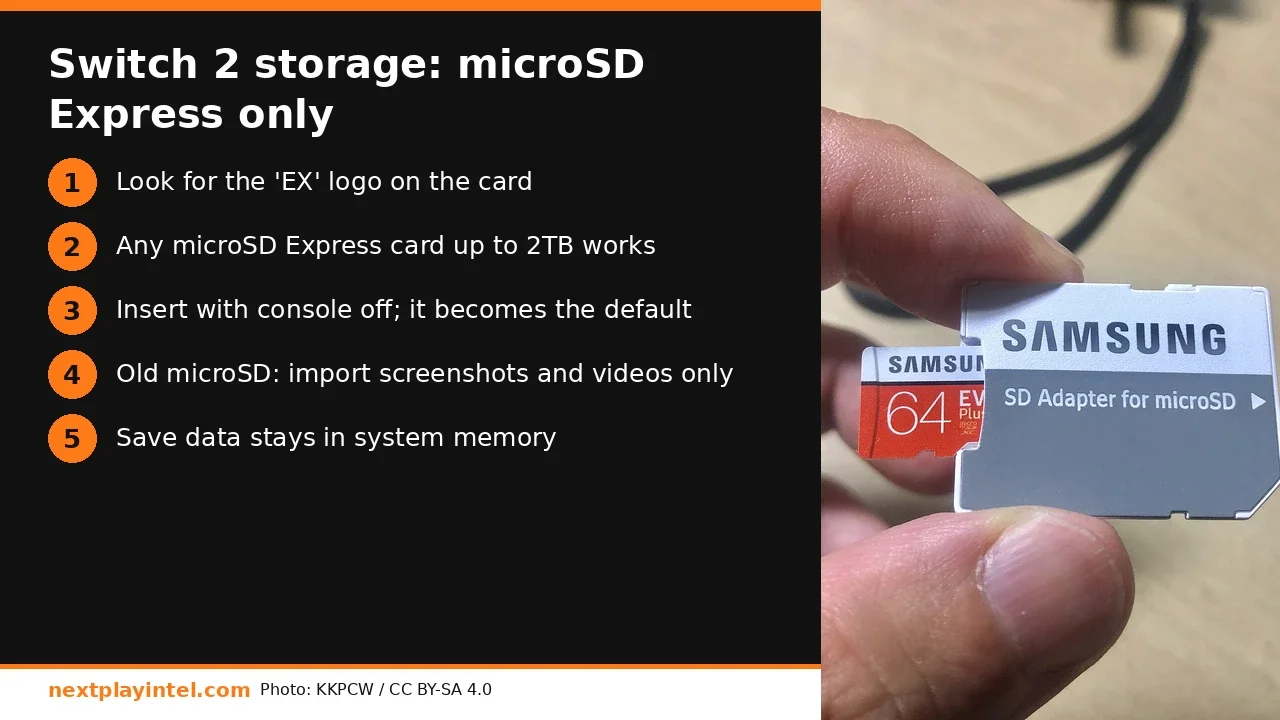
Short answer: Nintendo Switch 2 can only store games, updates, DLC, screenshots and videos on a microSD Express card. Look for the "EX" mark. Your old Switch microSD card, even a fast UHS-I or A2 card, works only for importing old screenshots and videos. Any microSD Express card up to 2 TB is supported. Game save data always stays in system memory.
Why your old card doesn't work
Nintendo says Switch 2 uses microSD Express because it reads much faster than older microSD cards, and games need that speed to run smoothly. Ordinary microSD, microSDHC and microSDXC cards fail that requirement, so Switch 2 refuses them for game data. Express cards still work in an original Switch, though only at older speeds.
Card type | Games, DLC, updates on Switch 2 | Screenshots/videos on Switch 2 | Original Switch |
|---|---|---|---|
microSD Express (EX logo) | Yes, up to 2 TB | Yes | Yes |
microSDXC / SDHC (UHS-I, A1/A2) | No | Import into system memory only | Yes |
Full-size SD card | No slot | No | No slot |
Switch 2 vs original Switch storage at a glance
The original Switch and OLED took any microSD, microSDHC or microSDXC card and ran games from it at UHS-I speeds, around 100 MB/s at best. Switch 2 doubles the internal storage to 256 GB and moves expansion to microSD Express, which uses a PCIe/NVMe-style interface. That's why a cheap card that was fine on your OLED is refused outright. Nintendo hasn't lowered the requirement for small or older games either: every downloaded Switch 1 game played on Switch 2 also has to sit in system memory or on an Express card. If you keep your old Switch, leave the old card in it. It's still the right card for that console.
How to set up a microSD Express card on Switch 2
Power the console off fully (hold POWER, then Power Options > Power Off). Don't insert or remove a card while it's on.
Insert the card label-up into the microSD slot until it clicks.
Turn the console on. If the card needs formatting, the console asks, and formatting erases the card.
From now on, the card is the default install location for downloaded software. You don't need to change any setting.
To move games you already installed, open System Settings > Data Management and move the software to the card. You can move screenshots and videos in either direction.
Bringing screenshots over from your old Switch card
Put the old Switch microSD card into the Switch 2 and choose Import from a Nintendo Switch microSD Card (in Data Management > Manage Screenshots and Videos). The captures copy into system memory. After that, take the old card out, because it can't be used for anything else. A full System Transfer from Switch to Switch 2 moves your saves and accounts separately. You can import the old card's captures after that.
Which size should you buy?
Switch 2 has 256 GB of internal storage. Big releases are getting bigger, and digital-heavy buyers fill that fast. Our rule of thumb:
Mostly physical game cards: internal storage plus a 128 GB card is enough for updates and a few downloads.
Mixed library: 256 GB is the best value per GB today.
Digital-only, many big games: 512 GB. Nintendo recommends one card per console. If you outgrow it, copy everything to a larger card, because software split across two cards can't be merged later.
How much actually fits
Download sizes vary a lot. Many Switch 2 releases and Switch 2 Edition upgrades are tens of GB once updates are included, while most indie games are under 5 GB. As a rough guide, a 256 GB card holds roughly 6-12 big Switch 2 games, or 40+ smaller titles. Check each game's size on its Nintendo eShop page before you buy. Updates land on the same card, so leave 10-15% free for patches. Physical game cards still install their updates on the card or internal storage, which is why even card-only buyers run out of space.
Troubleshooting
"This microSD card cannot be used": the card isn't Express. Check for the EX mark. Some fake listings sell ordinary cards as "for Switch 2".
Card not detected: power off, reseat the card, and clean the contacts with a dry cloth. Then test it in a phone or reader to rule out a dead card.
Downloads keep pausing: see our Switch download paused checklist (storage, network, sleep settings).
Saves missing after a card swap: saves never live on the card. Check the user profile, and Cloud Save if you have Nintendo Switch Online.
Related NextPlayIntel guides
Nintendo Switch 2 buyer page
Buying in India
microSD Express prices: India (₹) and US ($)
Checked 28 October 2026. India listings vary widely by seller, so check the EX logo and the seller warranty.
Card | India (₹) | US (USD), checked 28 Oct 2026 |
|---|---|---|
Samsung microSD Express 256 GB (for Switch 2) | ₹8,890 on Amazon.in (tracker, 21 Oct 2026); ₹5,890-₹6,999 at other India sellers (unconfirmed) | About $47.99 for the Samsung P9 256 GB at Amazon US and B&H (sale price, may end) |
SanDisk microSD Express 256 GB (Switch 2 licensed) | Unconfirmed | About $59 (list); unconfirmed today |
512 GB and 1 TB microSD Express | Unconfirmed | Unconfirmed |
Avoiding fake or mislabelled cards in India
Because microSD Express is new and expensive, marketplace listings often add "for Switch 2" to the title of a plain microSDXC card. Before you pay:
Check the listing photos for the EX mark on the card itself, not only on the box.
Look for "microSD Express" in the specifications, with read speeds in the hundreds of MB/s (Samsung advertises up to 800 MB/s for its Express card). "UHS-I", "U3" or "A2" alone means it's not Express.
Prefer the brand's own store or "sold by" the brand on Amazon.in or Flipkart, and keep the invoice for warranty.
After it arrives, insert it into the Switch 2. A fake or non-Express card is refused straight away, which gives you proof for a return.
Frequently asked questions
Can I use a normal microSD card on Switch 2?
Only to import screenshots and videos from an old Switch. Games, updates, DLC and new captures need a microSD Express card.
What is the maximum microSD Express size for Switch 2?
Nintendo says any card that meets the microSD Express standard, up to 2 TB, is supported.
Are saves stored on the microSD Express card?
No. Game save data stays in system memory and can't be copied to the card.
Does Switch 2 come with a microSD Express card?
No. Nintendo sells microSD Express cards separately.
Does a microSD Express card work in the original Switch?
Yes. Nintendo confirms microSD Express cards are compatible with the original Switch.
Sources & verification
Sources last verified on . This article covers published information, not hands-on testing.
Editorial & update notes
New guide published 28 Oct 2026 with official support citations and INR + USD prices checked 28 Oct 2026.