By Tulasiram Pemmadi · NextPlayIntel · Verified 2026-10-27 (Asia/Calcutta). AI-assisted research with human editorial review.
Install Red Dead Redemption 2 on PC through the storefront that owns your licence. Steam copies still require a Rockstar Games account and the Rockstar Games Launcher components; Rockstar Launcher purchases install and update there directly.
Verified 27 October 2026 (Asia/Calcutta). Account-link and supported-title facts follow Rockstar support; storage figures follow the Steam store requirements.
NextPlayIntel how-to cover. Not a platform screenshot.
Where your PC licence lives
Bought on | Install / updates | Rockstar account |
|---|---|---|
Steam | Steam library install; Steam manages updates | Required — launcher links to Steam |
Rockstar Games Launcher | Install inside Rockstar Launcher | Required — native library |
Epic Games Store (if owned) | Epic install; still signs into Rockstar | Required for authentication |
Retail PC key | Redeem in the matching launcher first | Required after activation |
Steam installs can be scanned into Rockstar Launcher per Rockstar's Steam install article. RDR2 is listed among Launcher-supported titles.
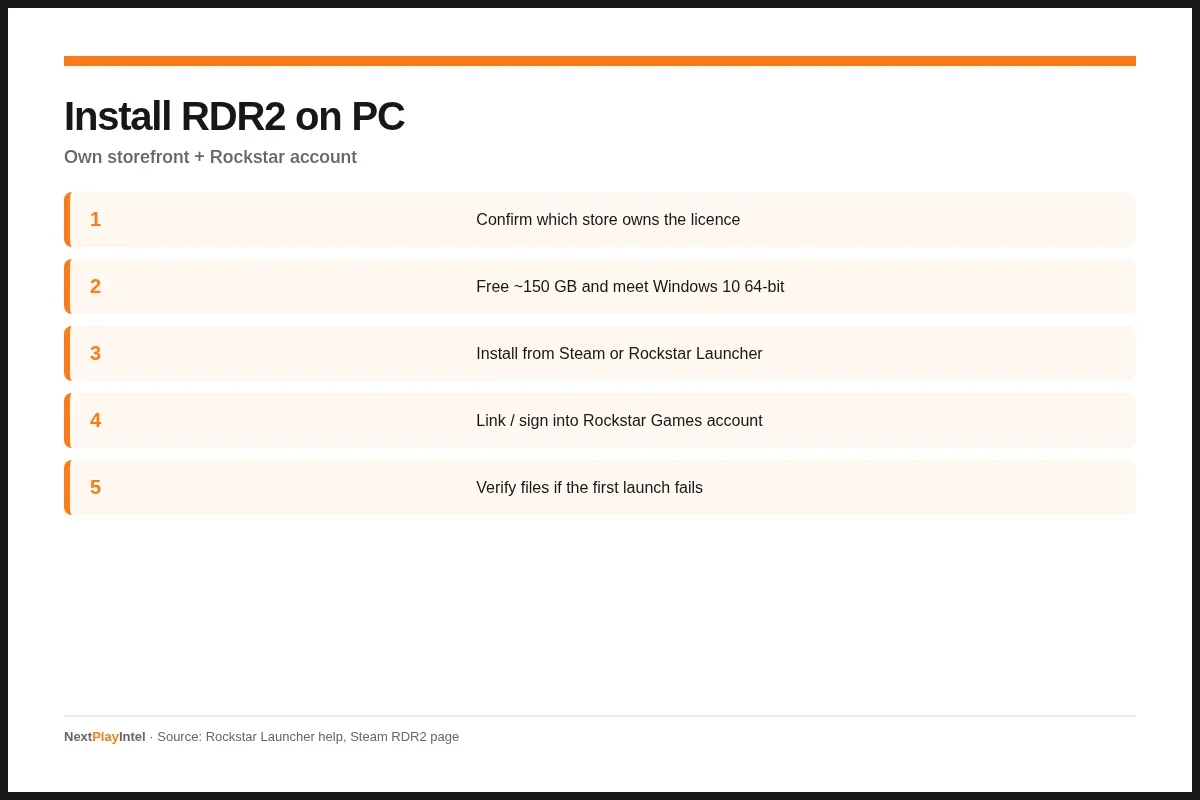
NextPlayIntel original infographic · Official support sources.
Install from Steam
Do not redeem a Rockstar Launcher key inside Steam or the reverse. Keys are storefront-specific.
Install and sign into the Steam client.
Purchase or redeem RDR2 on the Steam account that should own it.
Click Install and choose a drive with 150 GB free.
When prompted, create or sign into a Rockstar Games account and link it.
Launch from Steam; allow the Rockstar Launcher component to finish.
Install from Rockstar Games Launcher
Install the Rockstar Games Launcher from Rockstar's site, sign in, redeem or purchase RDR2, then Install to a large SSD. Keep the launcher online for the first patch. Rockstar lists RDR2 among titles supported in the Launcher library.
PC requirements checklist
Windows 10 64-bit (Steam minimum).
CPU at least Intel i5-2500K / AMD FX-6300 class.
8 GB RAM minimum; 12 GB recommended.
GPU GTX 770 2GB / R9 280 3GB class or better.
150 GB free storage — SSD strongly preferred.
After install: first-launch hygiene
Create a Windows restore point only if you also install mods later. For a clean Story run, skip overlays that inject into the process until the first successful save. If shaders compile for a long time on first boot, leave the game alone — interrupting can look like a hang.
Before you change storage settings or delete a second copy of a game, take thirty seconds to note the account email, console name, and whether the title is disc, digital, subscription, or shared. That note prevents the classic mistake of restoring licences on the wrong profile after a successful transfer.
When an official support article and a Store banner disagree, trust the support article for entitlement rules and the Store page for the live price or end date. Marketing pages sometimes summarise upgrades; the support steps are what customer care will follow if you open a ticket.
Indian Store accounts should keep payment methods and residential address aligned with the region where you bought the disc or voucher. Cross-region gifts and imported discs are the most common reason an upgrade offer never appears even when friends in another country see a free upgrade badge.
Record the exact on-screen error code, the account email in use, and whether the title is disc, digital, subscription, or shared before you contact platform support. That checklist shortens most tickets and prevents buying a second copy of software you already own on another profile.
Keep retailer invoices and platform purchase emails for the exact edition you own. When a storefront prompts you to buy again, cancel and confirm the signed-in user and SKU before you pay twice.
Prefer wired or strong Wi-Fi links for multi-gigabyte installs after a successful claim or redeem. A paused download is not a lost licence — resume the queue before you assume the code failed.
Record the exact on-screen error code, the account email in use, and whether the title is disc, digital, subscription, or shared before you contact platform support. That checklist shortens most tickets and prevents buying a second copy of software you already own on another profile.
Keep retailer invoices and platform purchase emails for the exact edition you own. When a storefront prompts you to buy again, cancel and confirm the signed-in user and SKU before you pay twice.
Prefer wired or strong Wi-Fi links for multi-gigabyte installs after a successful claim or redeem. A paused download is not a lost licence — resume the queue before you assume the code failed.
Record the exact on-screen error code, the account email in use, and whether the title is disc, digital, subscription, or shared before you contact platform support. That checklist shortens most tickets and prevents buying a second copy of software you already own on another profile.
Keep retailer invoices and platform purchase emails for the exact edition you own. When a storefront prompts you to buy again, cancel and confirm the signed-in user and SKU before you pay twice.
FAQ
Do I need Rockstar Launcher if I bought RDR2 on Steam?
Yes. Steam lists a required third-party Rockstar Games account. Steam still manages install and updates; Rockstar handles authentication.
How much disk space does RDR2 need?
Steam lists 150 GB available space for both minimum and recommended configs. Free more than that before starting so patches can stage.
Can I move a Steam copy into Rockstar Launcher?
Rockstar documents scanning the PC for supported Steam installs under Settings → General → Scan PC. Updates still go through Steam for those copies.
Install finished but the game crashes on launch.
Update GPU drivers, verify integrity on Steam (or repair in Rockstar Launcher), and check Rockstar's RDR2 support hub for current error codes such as ERR_GFX_STATE.
Is offline Story Mode available without signing in?
Initial setup and Rockstar authentication typically need a network connection. After that, offline Story availability follows Rockstar's current launcher policy — sign in at least once.
Related NextPlayIntel guides
Related internal links keep you inside the same troubleshooting cluster on nextplayintel.com. Write down exact error text before contacting platform support — it speeds up any ticket you open later. We re-checked the linked official help articles on the verification date in the byline. If a publisher changes menus or eligibility rules after that date, prefer the linked support page over any cached screenshot.
NextPlayIntel how-tos stay answer-first for Indian and global players: match account region, keep receipts, and separate software installs from save data before you delete anything. When a step needs a paid tier (for example PlayStation Plus cloud saves), we call that out instead of implying every feature is free.
If this page helped you recover a library entry or pick the correct version, bookmark the Sources section so you can re-check Sony or Nintendo wording the next time an offer window closes. Platform menus move; the official articles linked above remain the source of truth for entitlement and transfer rules.
Sources
Frequently asked questions
Do I need Rockstar Launcher if I bought RDR2 on Steam?
Yes. Steam lists a required third-party Rockstar Games account. Steam still manages install and updates; Rockstar handles authentication.
How much disk space does RDR2 need?
Steam lists 150 GB available space for both minimum and recommended configs. Free more than that before starting so patches can stage.
Can I move a Steam copy into Rockstar Launcher?
Rockstar documents scanning the PC for supported Steam installs under Settings → General → Scan PC. Updates still go through Steam for those copies.
Install finished but the game crashes on launch.
Update GPU drivers, verify integrity on Steam (or repair in Rockstar Launcher), and check Rockstar's RDR2 support hub for current error codes such as ERR_GFX_STATE.
Is offline Story Mode available without signing in?
Initial setup and Rockstar authentication typically need a network connection. After that, offline Story availability follows Rockstar's current launcher policy — sign in at least once.
Sources & verification
Sources last verified on . This article covers published information, not hands-on testing.
Editorial & update notes
Expanded with storefront table, FAQ/FAQPage and brand infographic (27 Oct 2026).