Short answer: you can change your PSN name (PlayStation calls it your online ID) on a PS5, in a web browser or in the PlayStation App. The first change is free; every change after that costs money. Changing it signs you out of all your devices. PlayStation says the large majority of the most-played PS4 games it tested support the change, but some older PS4 games may lose saved data or add-ons, so check PlayStation's tested-games list first. If anything breaks, switching back to your old ID is free.
This guide covers all three methods, the cost by region, the rules for a valid ID and what to do if something goes wrong. It's based on PlayStation Support's online ID pages for the US and India and PlayStation's own FAQ from launch, which we checked on 1 November 2026. We haven't tested a paid change ourselves, so where PlayStation doesn't give a number, we say so.
Which method should you use?
All three methods change the same account-wide online ID, so pick whichever device you have to hand. The web method is the easiest to type on; the PS5 method suits you if you're already on the console.
Method | Where to find it | Best for |
|---|---|---|
PS5 console | Settings > Users and Accounts > Account > Profile > Online ID | You're at the console with a controller |
Web browser | Account Management > Profile > Edit next to your online ID | Typing and checking names quickly on a phone or PC |
PlayStation App | Play menu > your profile picture > Edit Profile > Edit next to your online ID | You're away from the console |
PS4 console | Settings > Account Management > Account Information > Profile > Online ID | Owners who only have a PS4 |
PS3 or PS Vita | Not supported | These systems can't change an online ID |
How to change your online ID on PS5
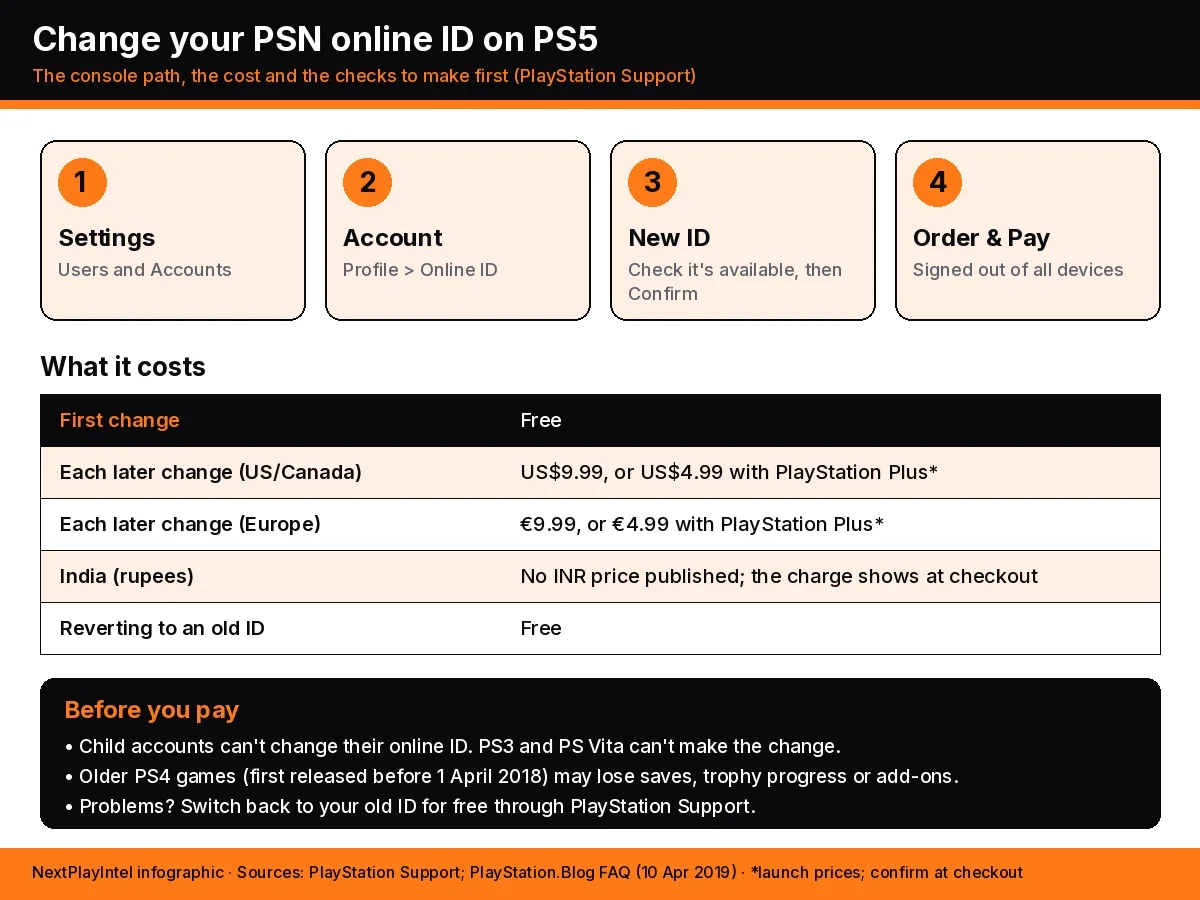
From the home screen, open Settings (the gear icon at the top right).
Go to Users and Accounts > Account > Profile > Online ID.
Enter the new online ID. If it's available, select Confirm.
Choose whether to show your old online ID next to the new one for 30 days. You can only choose this now, during the change.
Select Order & Pay to confirm. Your first change shows no charge; later changes show the price before you pay.
You're signed out of all devices once it's done. Sign back in on your PS5, PlayStation App and any PC games linked to your account.
How to change it in a web browser
Sign in to Account Management on the PlayStation website (see the official guide for the link) and select Profile from the sidebar.
Select Edit next to your current online ID.
Enter a new ID and select Check Availability. If it's available, select Continue.
Decide whether to show your old ID for 30 days.
Confirm the purchase. You're then signed out of all devices.
How to change it in the PlayStation App
Open the Play menu by tapping the controller icon.
Tap your profile picture to open your profile.
Select Edit Profile and enter your password.
Select Edit next to your online ID, enter a new one and tap Check availability, then Continue.
Choose whether to show your old ID for 30 days, then finish the purchase.
How much does it cost to change your PSN name?
The first change is free on every account that's allowed to change its ID. After that, PlayStation charges for each change. The current support pages for the US and India just say "a charge applies for additional changes" without a figure, so the reliable published numbers are the ones PlayStation gave when the feature launched in April 2019:
Change | US and Canada | Europe | India |
|---|---|---|---|
First change | Free | Free | Free |
Each later change | US$9.99 | €9.99 | No rupee price published |
Each later change with PlayStation Plus | US$4.99 | €4.99 | No rupee price published |
Switching back to a previous ID | Free | Free | Free |
Prices can change, and other regions use their own currency. The confirmation screen always shows the exact amount before you pay, so read it before selecting Order & Pay. Sources: PlayStation.Blog FAQ (US/Canada prices) and PlayStation.Blog en español (euro prices).
Rules for a valid online ID
PlayStation's account manual sets these rules for online IDs. The change screen checks them for you, but knowing them saves a few failed attempts:
3 to 16 characters long.
Letters, numbers, hyphens (-) and underscores (_) only.
The first character must be a letter.
It can't be the same as your password.
Letters aren't case-sensitive.
It must be available. Former IDs stay reserved for the player who used them, so nobody else can take them.
Names that break PlayStation's Terms of Service or Code of Conduct can be reported by other players. If a report is verified, your ID is replaced with Temp-xxxxxx.
Check these before you pay
Check | Why it matters |
|---|---|
Is this a child account? | Child accounts can't change their online ID. The family manager must upgrade the account to an adult account first, once the child is eligible. |
Do you play older PS4 games? | PlayStation says PS4 games first released on or after 1 April 2018 were built to support ID changes. Older games may not be, and remasters or complete editions of older games count as older. Check PlayStation's list of games tested with the feature. |
Are you mid-session in an online game? | You're signed out of every device after the change, so finish matches and let cloud saves upload first. |
Do your friends know? | Turn on the option to show your old ID for 30 days if you want friends to recognise you. You can't turn it on later. |
Is the name final? | Later changes cost money, so check spelling before you confirm. |
What changes and what stays the same
Changes | Stays the same |
|---|---|
The public name friends and other players see | Your sign-in ID (the email address you sign in with) |
The name people search for to find you | Your account itself: it's the same account with a new display name |
You're signed out of every device | Your previous IDs, which stay reserved for you so nobody else can take them |
PlayStation also says your online ID can be displayed on Discord if you link the two accounts.
If something goes wrong after the change
According to PlayStation, problems mostly show up in older PS4 games. They include your old ID still showing in some places, lost game progress or saved data, lost leaderboard data or trophy progress, parts of a game not working, and missing add-ons or virtual currency.
Problem | What to do |
|---|---|
A game misbehaves or content is missing | Switch back to your previous online ID. It's free and PlayStation says it should fix most issues. Ask through PlayStation Support's Online Assistant. |
Your new ID hasn't appeared after a week | Contact PlayStation Support. |
Your ID changed without your permission | Contact PlayStation Support straight away and secure your account: change your password and turn on 2-step verification. |
Your new ID became Temp-xxxxxx | It was reported and found to break the Terms of Service. Pick a different new ID, or ask Support to switch you back to your original. |
Your original ID became Temp-xxxxxx | The original was reported as inappropriate, and PlayStation says this can't be reversed. Choose a new ID. |
Full details are on PlayStation's online ID troubleshooting page.
Related PS5 guides
How to set up a PS5 covers account sign-in and the first settings to change.
PS5 game locked? How to restore licenses helps if games show a lock icon after signing back in.
PS5 console sharing and offline play explains which console is your primary PS5.
How to cancel a PS Store pre-order and get a refund covers PlayStation Store refund rules.
FAQ
Is changing your PSN name free?
The first change is free. PlayStation charges for each change after that. At launch in April 2019 the charge was US$9.99 (US$4.99 with PlayStation Plus) in the US and Canada, and €9.99 (€4.99 with PlayStation Plus) in Europe. PlayStation's current support page only says a charge applies, so check the price on the confirmation screen before you pay.
How much does a PSN name change cost in India?
PlayStation doesn't publish a rupee price for later online ID changes. The first change is free in India too, and the confirmation screen shows the charge for later changes before you pay.
Where is the online ID setting on PS5?
Go to Settings > Users and Accounts > Account > Profile > Online ID. Enter the new ID, select Confirm, decide whether to show your old ID for 30 days, then select Order & Pay.
Will I lose my games or trophies if I change my PSN name?
It's the same account with a new name, but PlayStation warns that some PS4 games, mainly ones first released before 1 April 2018, may lose saved data, leaderboard data, trophy progress or add-ons after a change. Check PlayStation's list of tested games first.
Can I change back to my old PSN name?
Yes. Reverting to a previous online ID is free, as long as that ID doesn't break PlayStation's Terms of Service. Your old IDs are reserved for you, so nobody else can take them.
Can a child account change its online ID?
No. Online IDs can't be changed on child accounts. When the child is old enough, the family manager can upgrade the child account to an adult account, which can then change its ID.
Why did my online ID change to Temp-xxxxxx?
PlayStation received a verified report that your ID breaks its Terms of Service, so it replaced the name. You can pick a new ID. If only the new ID was reported and your original was fine, you can ask PlayStation Support to switch you back.
Does my sign-in email change when I change my online ID?
No. Your sign-in ID is the email address you use to sign in, and it stays the same. Only the public name that friends and other players see changes.
Frequently asked questions
Is changing your PSN name free?
The first change is free. PlayStation charges for each change after that. At launch in April 2019 the charge was US$9.99 (US$4.99 with PlayStation Plus) in the US and Canada, and €9.99 (€4.99 with PlayStation Plus) in Europe. PlayStation's current support page only says a charge applies, so check the price on the confirmation screen before you pay.
How much does a PSN name change cost in India?
PlayStation doesn't publish a rupee price for later online ID changes. The first change is free in India too, and the confirmation screen shows the charge for later changes before you pay.
Where is the online ID setting on PS5?
Go to Settings > Users and Accounts > Account > Profile > Online ID. Enter the new ID, select Confirm, decide whether to show your old ID for 30 days, then select Order & Pay.
Will I lose my games or trophies if I change my PSN name?
It's the same account with a new name, but PlayStation warns that some PS4 games, mainly ones first released before 1 April 2018, may lose saved data, leaderboard data, trophy progress or add-ons after a change. Check PlayStation's list of tested games first.
Can I change back to my old PSN name?
Yes. Reverting to a previous online ID is free, as long as that ID doesn't break PlayStation's Terms of Service. Your old IDs are reserved for you, so nobody else can take them.
Can a child account change its online ID?
No. Online IDs can't be changed on child accounts. When the child is old enough, the family manager can upgrade the child account to an adult account, which can then change its ID.
Why did my online ID change to Temp-xxxxxx?
PlayStation received a verified report that your ID breaks its Terms of Service, so it replaced the name. You can pick a new ID. If only the new ID was reported and your original was fine, you can ask PlayStation Support to switch you back.
Does my sign-in email change when I change my online ID?
No. Your sign-in ID is the email address you use to sign in, and it stays the same. Only the public name that friends and other players see changes.
Sources & verification
Sources last verified on . This article covers published information, not hands-on testing.
- PlayStation Support (US): How to change your PlayStation online ID
- PlayStation Support (India): How to change your PlayStation online ID
- PlayStation Support: How to troubleshoot issues after changing your online ID
- PlayStation.Blog: Online ID Change on PSN, Your Questions Answered (10 April 2019)
- PlayStation.Blog en español: online ID change FAQ with euro prices (10 April 2019)
- PlayStation manual: Signing up for PlayStation Network (online ID rules)
Editorial & update notes
Published 1 Nov 2026 from PlayStation Support (US and India) and PlayStation.Blog's online ID change FAQ.