Last updated 28 October 2026 · Prices checked 28 Oct 2026 · Rules from Xbox Support
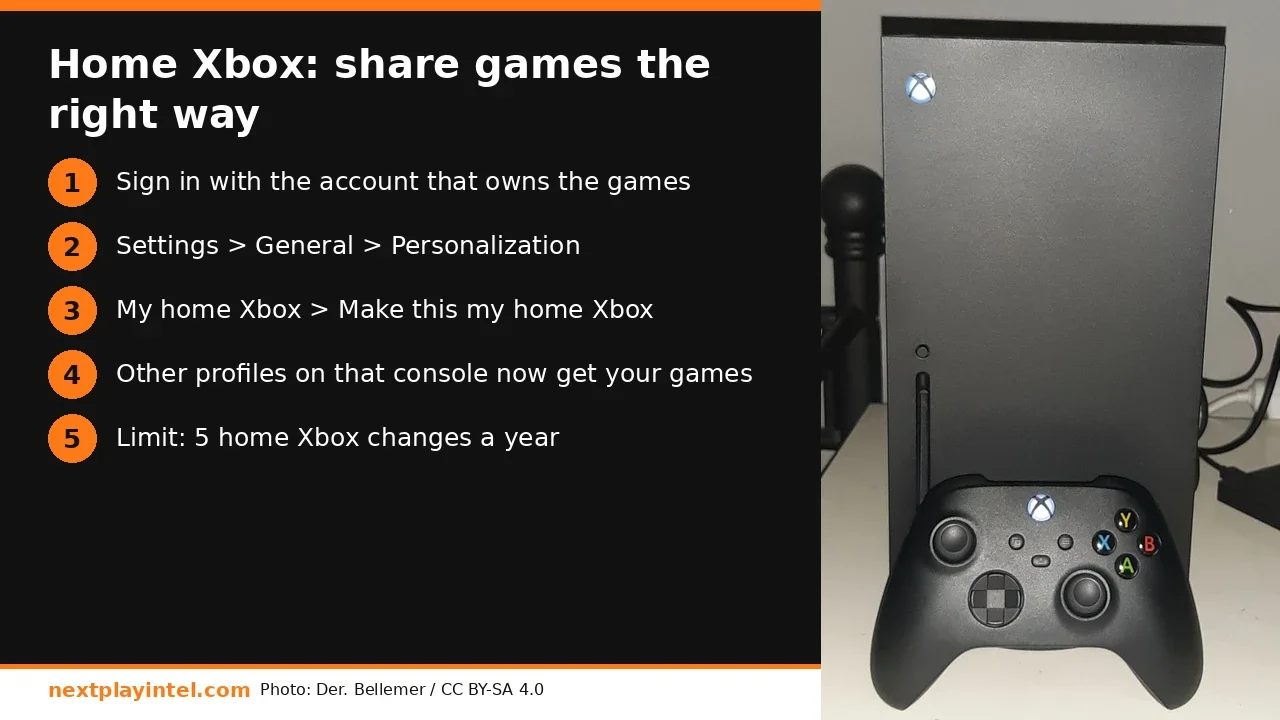
Short answer: To share your Xbox games, sign in on the console with the Microsoft account that bought them. Then press the Xbox button and go to Profile & system > Settings > General > Personalization > My home Xbox > Make this my home Xbox. After that, every profile on that console can play your digital games and use your Game Pass, even when you're signed out. You can have one home Xbox at a time and change it up to five times in any 12-month period.
What "home Xbox" actually does
Xbox Support says that making a console your home Xbox gives friends and family access to your games and content when you're not signed in. It also lets you play your digital games offline. In practice:
On your home Xbox: anyone with a profile on that console can play the digital games you bought and the games in your Game Pass plan, using their own profile, saves and achievements.
On any other Xbox: you can still play everything, but only while you're signed in there.
Offline play: your home Xbox can start your digital games without checking the internet, which helps during broadband cuts.
How to set or change your home Xbox (Series X|S and One)
Turn on the console you want as home and sign in with the Microsoft account that owns the games. If it isn't on the console yet, add it from Profile & system > Add or switch > Add new.
Press the Xbox button to open the guide.
Go to Profile & system > Settings > General > Personalization.
Select My home Xbox. The screen tells you whether this console is already your home Xbox.
Select Make this my home Xbox and confirm.
New consoles often set this automatically. If you add an account during setup and don't choose "Lock it down", Xbox makes that console your home Xbox. If you upgraded from an Xbox One to a Series X|S, check this setting, because the old console may still be home.
Rules and limits you can't get around
Rule | What it means |
|---|---|
One home Xbox at a time | Setting a new one removes sharing from the old one |
Five changes per year | Up to five switches in any one-year period. Xbox Support says customer support can't give you extra switches |
Reset wipes it | If you reset a console and remove everything, set it as home again |
Digital content only | Discs still need the disc in the drive. Series S has no drive at all |
Subscriptions follow it | Game Pass games are shared on the home console under the same rule |
Two common family setups
One console at home: make it your home Xbox. Everyone in the family uses their own profile, gets your library and keeps separate saves. This is the simplest and most reliable setup.
Two consoles, for example a Series X in the living room and a Series S in a bedroom: make the one other people use more often your home Xbox. On the second console, your account has to stay signed in for others to use your games. Microsoft's community answers describe the same setup: one console shares through home Xbox, and the other shares while you're signed in.
Swapping home consoles with a friend in another city is popular on Reddit, but it means your account sits on their console. Only do it with someone you trust completely, and remember the five-changes-a-year limit.
Troubleshooting: "My family can't play my games"
Check which console is home: open My home Xbox on the console. If it offers "Make this my home Xbox", it isn't home yet.
License error on a game: sign in with the owner account once, launch the game, then sign out and test again.
Game Pass games locked: make sure the subscription is active. A failed renewal on a card or UPI mandate blocks everyone at once.
Offline problems: connect to the internet once so the console can sync your licences, then try offline again.
Out of changes: the console shows the date you can next switch. Waiting is the only option.
Keep your account safe while sharing
Home Xbox shares your licences, not your password. But setting it up on someone else's console means your profile sits on their machine. Protect yourself:
Add a passkey to your profile: Profile & system > Settings > Account > Sign-in, security & passkey. Choose "Ask for my passkey" so nobody else can open your profile or buy things with your payment method.
Require a passkey for purchases: on the same screen, block purchases without the passkey. This matters with children in the house and a saved card or UPI mandate.
Use Microsoft Family Safety for child accounts. That way a shared library doesn't mean shared spending, and you can set age limits per child.
Turn on two-step verification on the Microsoft account itself at account.microsoft.com.
Home Xbox vs just signing in: quick comparison
Signing in on a console gives you everything there, but only while you stay signed in, and only you get it unless that console is your home Xbox. Home Xbox gives everyone on the console your games all the time, works offline, and costs one of your five yearly changes. For one family console, home Xbox is the right choice. If you're only visiting a friend for a weekend, just sign in and remove your account afterwards from Profile & system > Add or switch.
Related NextPlayIntel guides
Xbox Series X buyer page
Buying in India
What sharing saves: Game Pass prices in India (₹) and the US ($)
Home Xbox shares your Game Pass plan with every profile on that console, so one subscription covers a family. Monthly list prices checked on 28 October 2026, from the official Xbox stores:
Plan | India (₹/month) | US (USD/month), checked 28 Oct 2026 |
|---|---|---|
Game Pass Ultimate | ₹1,089 (xbox.com/en-IN) | $22.99 after Microsoft's 21 April 2026 price cut (Xbox Wire) |
Game Pass Premium | ₹699 (xbox.com/en-IN) | Unconfirmed |
Game Pass Essential | ₹499 | Unconfirmed |
Prices can change, and Xbox shows the final price at checkout. In India it includes GST.
Frequently asked questions
How many times can I change my home Xbox?
Up to five times in any one-year period. Xbox Support says customer support can't give you extra changes.
Can I have two home Xboxes?
No. You can only have one home Xbox at a time. On other consoles you can play your games only while you're signed in.
Does home Xbox share Game Pass?
Yes. Profiles on your home Xbox can play the games in your Game Pass plan without you being signed in.
Do I need to set home Xbox again after a factory reset?
Yes. Xbox Support says to set it again if you reset the console and remove everything.
Can home Xbox share disc games?
No. Home Xbox shares digital licences. Disc games still need the disc in the drive.
Sources & verification
Sources last verified on . This article covers published information, not hands-on testing.
Editorial & update notes
New guide published 28 Oct 2026 with official support citations and INR + USD prices checked 28 Oct 2026.