IN BRIEF
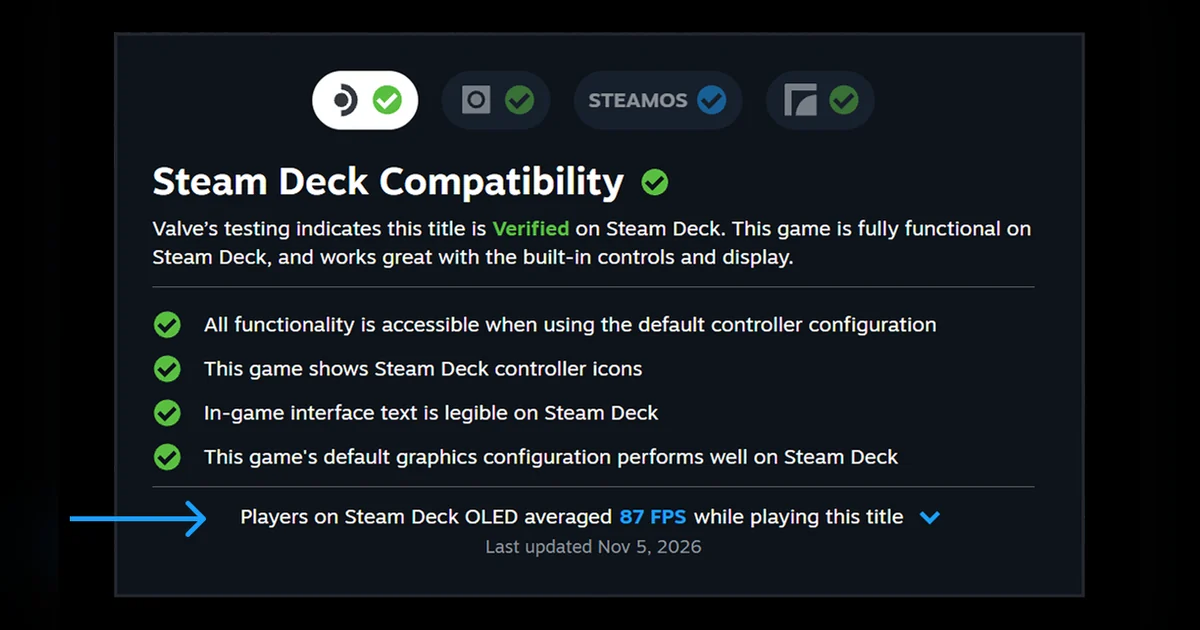
Steam Deck average framerate data is now on the Steam Store and in the Steam Client on desktop and Deck, Valve said in an 11 November 2026 update to its 10 November post. The figures come from opted-in Deck players and sit under Steam Deck Compatibility on each tested game's Store page.
Key facts
Item | What Valve says |
|---|---|
First announced | 10 November 2026, 6:08 AM IST |
Available to everyone | Update dated 11 November 2026: Store and Steam Client, desktop and Deck |
Where to look | Game's Store page > Steam Deck Compatibility > Learn more |
Which games | Games tested for Deck compatibility: Verified, Playable and Unsupported |
Data source | Anonymised data from Deck players who opted in |
Settings used | Default frame limit only: 90 FPS on OLED, 60 FPS on LCD |
Minimum data | A threshold of data points must be met before a game shows figures |
How to check a game's Deck framerate
Open the game's page on the Steam Store.
Go to the Steam Deck Compatibility section and select Learn more.
Read the average framerate line for Steam Deck OLED or LCD.
Expand the detail view to see the framerate histogram.
Valve says thousands of games already have data, and the number will grow.
What the histogram tells you
The histogram shows the percentage of samples at each framerate. Valve says small columns at low framerates point to hitches or stutter.
You may also see a gap, for example between 90 and 45 FPS. Valve says this usually comes from VSync. When a game can't hold the display's refresh rate, VSync drops a frame to half rate and then recovers. On a 90Hz OLED, a game averaging 75 FPS shows a 90-90-45 pattern. A game capped at 60 internally will also bounce between 90 and 45 on an OLED set to the default.
Why Valve added it
Verified ratings use standard test criteria, but Valve admits they may not match everyone's bar for performance. An Unsupported game might be playable for some players, while a Verified game might not hit the framerate others want. Real average figures help you decide before you buy or play.
Opting in or out
You'll get a prompt in the Steam Library. You can change it any time in Steam Account Settings > Data & Browsing > Anonymous Game Framerate Data. Valve says most Deck players have opted in.
The data ignores custom in-game settings, though Valve says results still cluster in fairly narrow ranges. Valve is also asking desktop users to opt in on Steam Client Beta, as a step toward framerate data for more devices than the Deck.
If a game runs badly on your Steam Deck, start with our Steam Deck troubleshooting guide. Valve also shipped Steam Achievement Sets the same week. More from Valve.
Frequently asked questions
Where do I find Steam Deck average framerate data?
Valve says it's on each game's Steam Store page under Steam Deck Compatibility > Learn more, and in the Steam Client on desktop and on Deck.
How is the Steam Deck average framerate calculated?
Valve uses anonymised data from Deck players who opted in, filtered to Decks at the default frame limit: 90 FPS on Steam Deck OLED and 60 FPS on Steam Deck LCD. Idle time and invalid samples are removed.
What does the Steam Deck framerate distribution histogram show?
It breaks down the percentage of data samples at each framerate, so you can see how the average is produced and how often players hit hitches or stutter.
How do I opt out of sharing framerate data?
Go to Steam Account Settings > Data & Browsing > Anonymous Game Framerate Data. You may also see an opt-in prompt in your Steam Library.
Sources & verification
Sources last verified on . This article covers published information, not hands-on testing.